SEO
May 12, 2026
Google Analytics SEO report: how to build and automate in 2026



Do your GA4 SEO reports stop at traffic?
That might show how many people arrive from organic search, but it doesn’t explain what happens next. Clients want to know whether SEO is driving leads, sales, and revenue, and whether the investment is paying off.
A Google Analytics SEO report tracks how organic search contributes to visits, engagement, and conversions.
The challenge is building one that's clear, repeatable, and easy to share.
This guide covers the key SEO metrics to track in GA4, how to build a report step by step, where GA4 falls short, and how to automate the whole process with Reporting Ninja.
GA4 is most useful for SEO reporting when you connect organic visibility to on-site behavior and real business outcomes. Here are the four metric groups that matter most.
Start with organic sessions, active users, new users, and session source/medium. These show how much traffic comes from organic search and whether it's growing.
For client reporting, don't show organic traffic as a standalone win. A traffic increase only matters if the users are relevant. Segment by default channel group, country, device, and landing page to show where growth is coming from (and whether it matches the client's target audience).
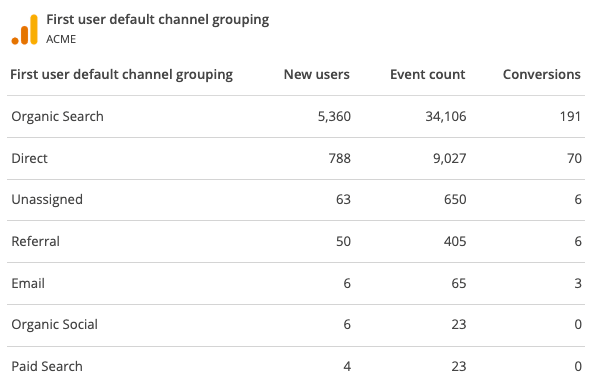
Landing page data is one of the most practical SEO views in GA4. It shows which pages users arrive on first, then links those pages to engagement and conversion behavior.
Track sessions, engaged sessions, engagement rate, average engagement time, key events, and revenue by landing page. GA4 includes a pre-built landing page report under Engagement, making it straightforward to see which entry pages are working and which ones need better CTAs, internal links, or content.
If Search Console is connected to GA4, you can report on clicks, impressions, CTR, and average position alongside Analytics data.
This helps explain the gap between visibility and results. A page may have rising impressions but flat clicks, pointing to weak titles or poor SERP fit. Another may have fewer clicks but strong conversions, making it more valuable than a high-traffic page.
Note that Search Console data in GA4 is limited to a 16-month window.
The strongest SEO reports connect organic traffic to outcomes. In GA4, that means tracking key events, conversion rate, form submissions, demo requests, purchases, and total revenue.
For ecommerce clients, prioritize organic revenue, purchase events, and average order value. For lead gen, focus on form completions, calls, and bookings. This is where tools like Reporting Ninja's Google Analytics reporting add real value, turning these metrics into recurring client-ready reports without manual rebuilding each month.
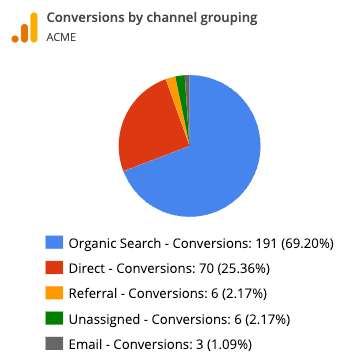
A useful GA4 SEO report answers three questions: where did organic traffic come from, what did users do after landing, and did those visits lead to meaningful outcomes? These five steps are how you build it.
Before building the report, be clear on what it needs to prove. For most SEO clients, that means tracking organic traffic growth, landing page engagement, and conversions tied to business goals.
In GA4, important actions are tracked as key events. Common ones for SEO reporting include form submissions, demo requests, bookings, calls, purchases, and quote requests.
Isolate organic search traffic so your SEO data isn't mixed with paid, referral, direct, or social. In GA4, use the Traffic Acquisition report and filter by session default channel group or session source/medium.
For client reporting, include: organic sessions, active users, new users, engaged sessions, engagement rate, average engagement time, key events, and revenue where relevant.
SEO reports become more useful when they show which pages generated performance, not just which channel drove traffic. Use GA4's landing page report to review the pages users arrived on first.
For each landing page, track sessions, engaged sessions, engagement rate, average engagement time, key events, revenue, and organic source. This helps you explain whether a page needs more traffic, stronger CTAs, better internal links, or conversion-focused improvements.
If Search Console is linked to GA4, add search visibility metrics to your report. This connects pre-click SEO performance (impressions, position) with post-click behavior (engagement, conversions).
Report on clicks, impressions, CTR, average position, and landing pages. This is especially useful for explaining traffic changes: impressions may rise while clicks stay flat, suggesting weak titles or lower-CTR ranking positions.
Once the core data is in place, organize it into a structure clients can understand quickly:
You can build this manually in GA4, but if you're sending recurring reports to multiple clients, manual reporting doesn't scale. That's where Reporting Ninja's Google Analytics SEO dashboard fits naturally, automating the build so you spend time on insights, not formatting.
{{cta-block-v1}}
GA4 is powerful for analysis, but it has real limitations when it comes to client-ready, repeatable SEO reporting.
GA4 is built for marketers, not clients. Founders and stakeholders don't need every dimension and exploration, they need answers to: Is organic traffic growing? Which pages are driving leads? What changed?
GA4 can surface the data, but turning it into a polished report takes significant extra work. Use GA4 for diagnosis; use a dedicated SEO reporting tool for client-facing outputs.
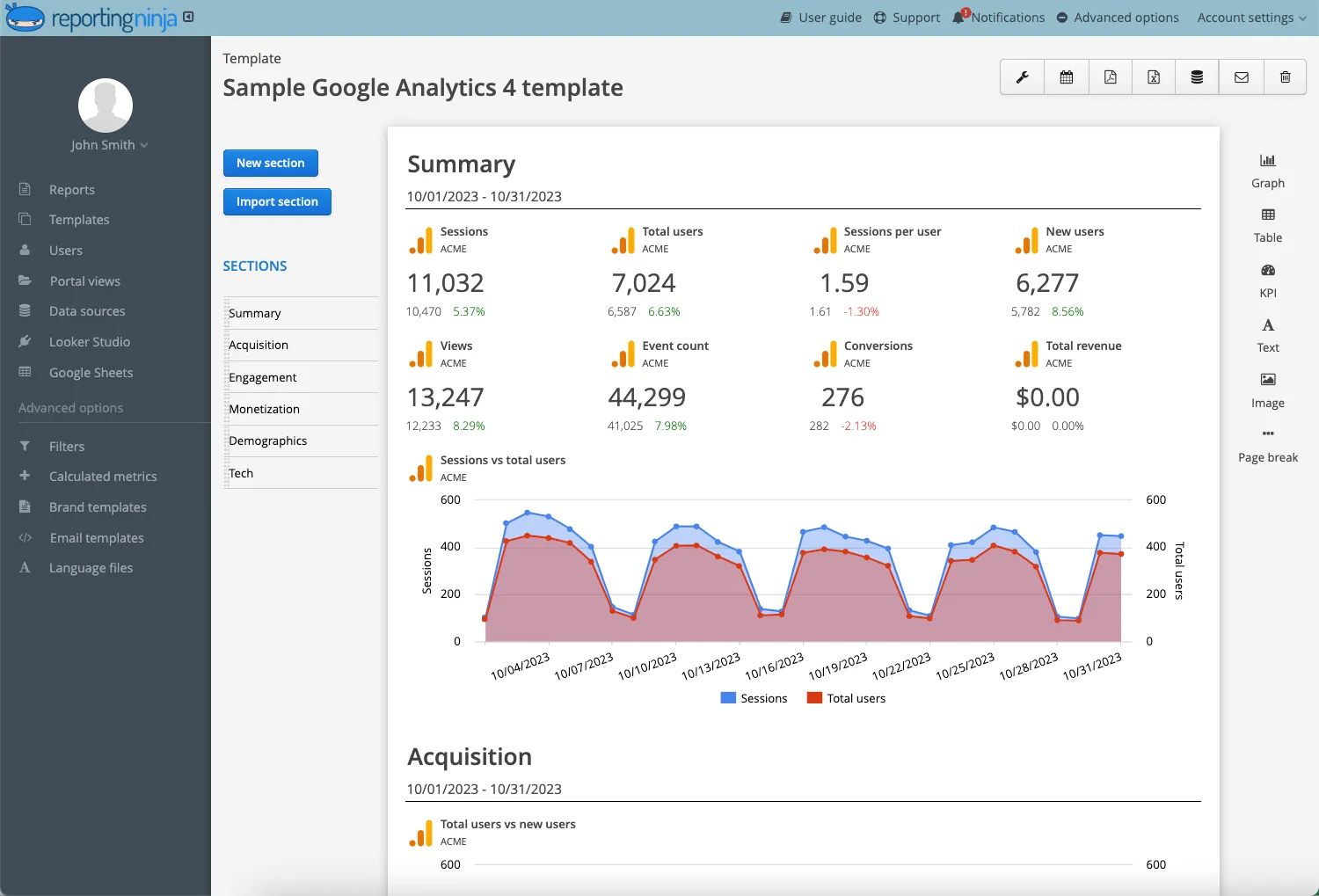
GA4 doesn't tell the full SEO story alone. Ranking data, query-level detail, and CRM conversions often live elsewhere. A complete picture usually requires GA4 traffic data, Search Console visibility, rank tracking, and revenue or pipeline data, all combined into one report.
Reporting Ninja helps centralize this by consolidating multi-channel data, so you're not rebuilding the story manually each month. Explore the full list of integrations here.
GA4 applies data thresholds to prevent identification of individual users based on demographics or interests. For SEO reporting, this matters most for small clients, niche landing pages, or early-stage campaigns — precisely where you need granular detail.
GA4 can group lower-volume dimension values into an "other" row when report limits are hit. Sampling can also occur for large sites, long date ranges, or detailed landing page breakdowns, meaning you may not always see every page or query clearly.
Manual GA4 reporting is manageable for one site. Across multiple clients, it becomes a bottleneck: pulling the same metrics, applying the same filters, rebuilding charts, and checking numbers every cycle. This leads to slow turnaround, copy-paste errors, and inconsistent reports.
Manual reporting makes sense for one-off analysis. Automation is better when you need consistent SEO reports every week or month (especially across multiple clients).
Start by deciding how you'll build and deliver the SEO report. Reporting Ninja's custom reports platform supports client-ready reports, Looker Studio connectors, and automated workflows. Match the format to the audience: a founder may want a concise monthly PDF; a technical SEO manager may prefer an interactive dashboard.
Connect GA4 so your report automatically pulls SEO traffic, engagement, and conversion data. For a stronger report, layer in Search Console, paid media, social, CRM, or ecommerce data using Reporting Ninja's integrations.
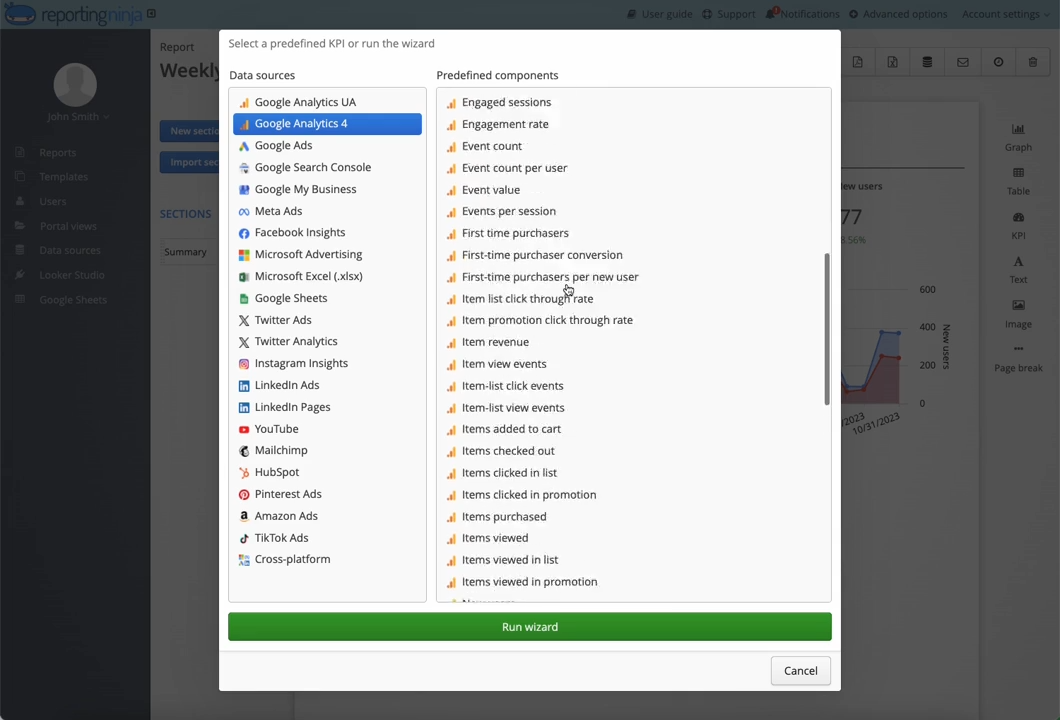
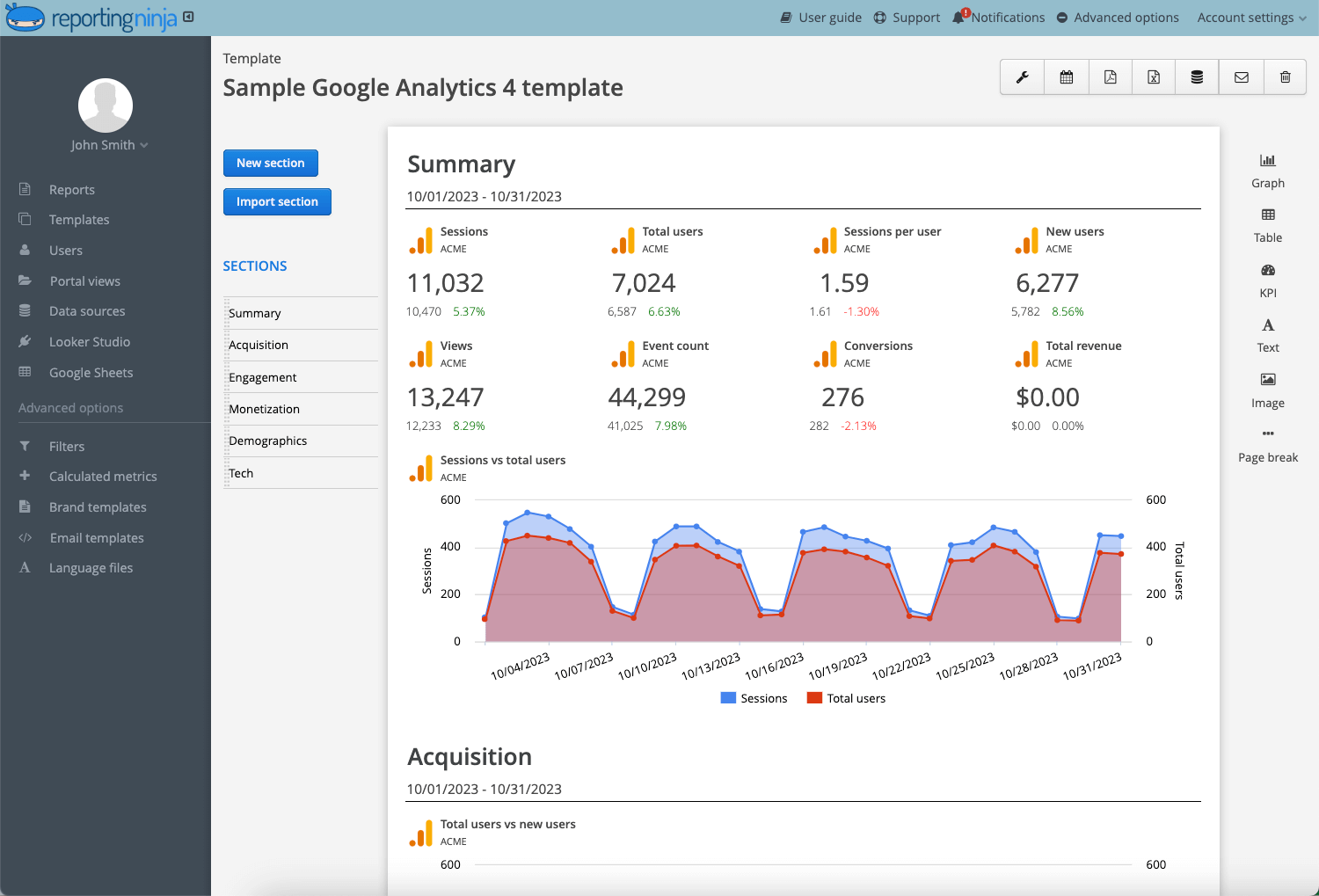
Use Reporting Ninja's SEO reporting tool templates instead of starting from scratch. A solid SEO report template includes: organic traffic trend, top landing pages, engagement by landing page, key events, revenue, Search Console trends, month-over-month changes, and recommended actions.
Templates create consistency—every client gets the same core structure, with room to adapt for specific goals.
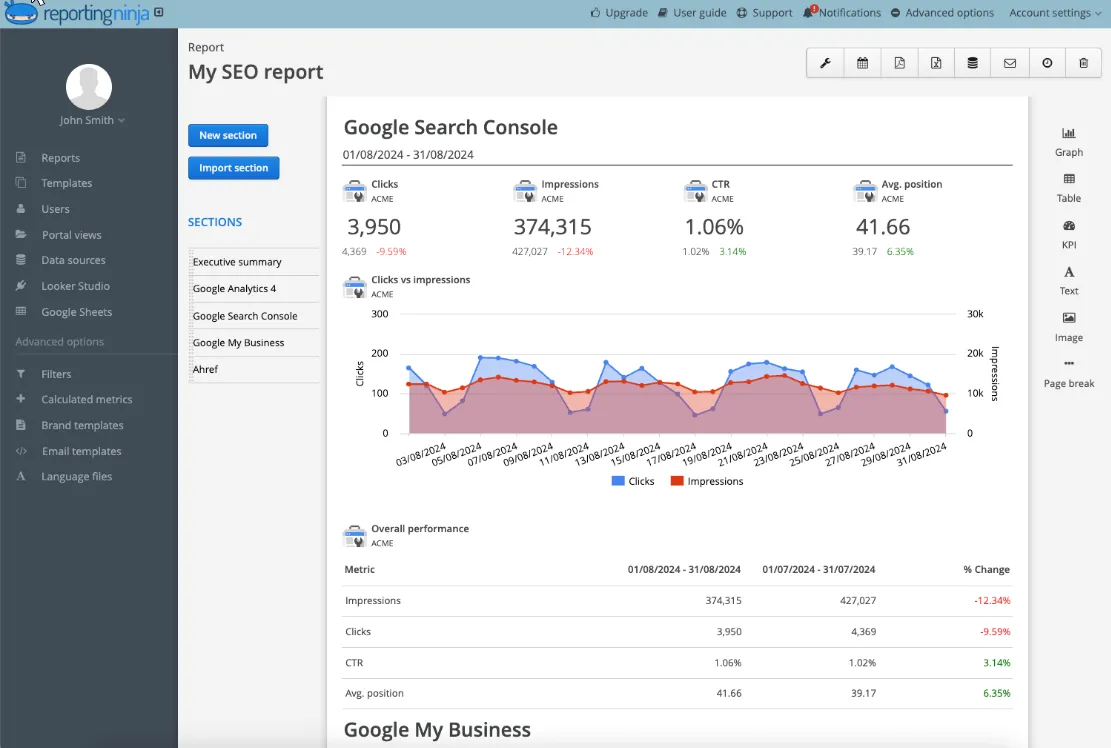
Automation shouldn't mean generic reports. For lead gen clients, surface organic leads, form submissions, and high-intent landing pages. For ecommerce, prioritize organic revenue and purchase events. For local SEO, include location pages and geographic trends.
Reporting Ninja supports full customization: widget selection, filters, chart types, branding, logos, colors, and fonts. The white-label SEO dashboard option also lets you deliver fully branded client portals.
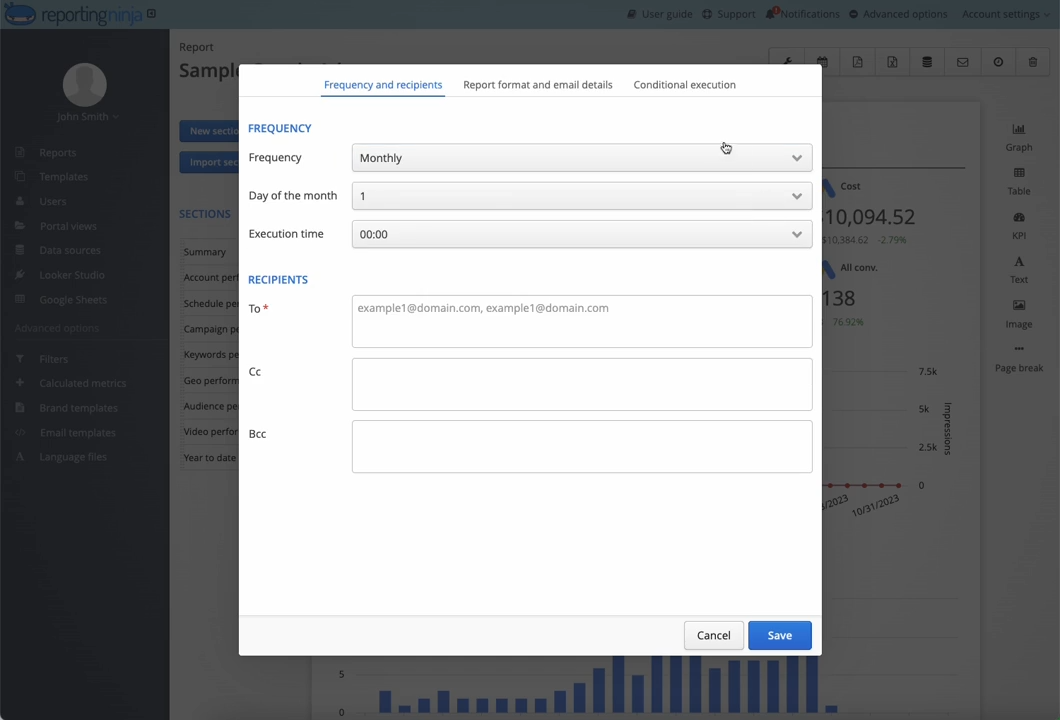
Finally, schedule the report so it reaches clients at the right cadence. A simple rhythm:
Before fully automating delivery, review the report once for missing data, wrong filters, or broken charts. Then standardize the quality check so every client report goes out consistently.
The best SEO report structure depends on the client, campaign maturity, and business model. These three examples give you practical starting points you can adapt for monthly or weekly reporting.
Best for clients who want a clear monthly summary without technical detail.
Include: executive summary, organic traffic trend, top landing pages, engagement rate, key events from organic traffic, Search Console metrics, month-over-month changes, and next actions.
This structure gives clients the full picture: what changed, why it matters, and what the team should prioritize. It also gives you a useful framework for building SEO report examples around business outcomes.
Best when the goal is to understand which pages are creating real value.
Include: top organic landing pages by sessions, engagement rate and key events by page, revenue or lead value by page, pages with traffic growth/decline, pages with high traffic but low conversions, and recommended updates by page.
Especially useful for content SEO, local SEO, and service-page optimization.
Ready to stop rebuilding the same reports every month? Try Reporting Ninja free and automate your GA4 SEO reporting in minutes.
Google Analytics and Data Studio (previously Looker Studio) work well for exploration and custom dashboards. Reporting Ninja is the stronger fit when you need recurring, branded, client-ready SEO reports across multiple clients and channels.
GA4 gives you the data. Reporting Ninja turns it into reports that clients can actually read.
Connect your SEO data sources, start from a template, customize for each client, and schedule delivery. All without having to rebuild from scratch every month.
Whether you're managing five clients or fifty, Reporting Ninja makes SEO reporting faster, more consistent, and easier to scale.
Start your free trial and see how much time you can save!
{{cta-block-v1}}
An SEO report in Google Analytics shows how organic search contributes to traffic, engagement, conversions, and revenue on your site.
Yes. GA4 supports SEO reporting through acquisition reports, landing page reports, explorations, comparisons, and connected Search Console data.
It should include organic traffic, landing page performance, engagement metrics, key events, revenue, Search Console visibility data, and recommended next actions.
Sometimes. GA4 covers on-site behavior and conversions well, but a complete SEO report usually also needs Search Console data, ranking information, and multi-channel context.
Sign up for a 15 days free trial. No credit card required.

Build and automate amazing custom reports in a few clicks. Save time, be more productive, impress your clients.