Analytics
November 10, 2026
Claude for marketing with prompts (incl. pros & cons)



Marketing teams now cover content, SEO, paid ads, email, and reporting, often with the same few people. Most teams use AI in scattered one-off chats, so the help never becomes a repeatable process.
Claude is an AI assistant that marketers use to speed up content, research, and reporting. Claude for marketing works best when you set it up once and reuse that setup to save time across similar tasks.
This guide covers why marketers use it, how to set it up, seven use cases, ready-to-use prompts, best practices, and its limits.
Marketers use Claude because it handles long inputs, follows detailed style rules, and writes in a direct voice. These four strengths matter most for marketing work:
Claude covers writing, research, and analysis pretty well. For finished photos, video, or live client dashboards, a dedicated design, video, or reporting tool may fit that part of the job better.
Set up Claude once with a plan, a Project for each brand or client, saved prompts, and connections to your data. Each step takes a few minutes, and every chat later starts with that context already in place.
| Step | What to do | Plans |
|---|---|---|
| Pick a plan | Start on Free to test, then move to Pro or Team for added capabilities if needed | All plans |
| Create a Project | Add brand guidelines and past examples as Project files, then write Project instructions, so every chat follows the same context | Free (up to five), Pro, Team, and Enterprise |
| Save reusable prompts | Keep your best prompts in a Project file or a shared doc | All plans |
| Connect your data | Add connectors or an MCP server for the tools that hold your marketing data | All plans |
| Share with your team | Share Projects so everyone uses the same instructions | Team and Enterprise |
Most marketing teams stop short of connecting data. Reporting Ninja offers an AI connector (MCP) that gives Claude access to the accounts you connect in our marketing integrations, such as Google Ads, GA4, and Meta Ads. You can then ask Claude questions about campaign performance, investigate changes, and uncover insights across channels without manually pulling data from each platform.
{{cta-block-v1}}
We’ve seen successful teams use Claude for these seven jobs, from first drafts to monthly reports. Each prompt works best inside a Project that already contains your brand-voice brief.
| Use case | What Claude does | Best for | Example prompt |
|---|---|---|---|
| Content creation and repurposing | Turns one source into posts, emails, and articles | Content teams and agencies | “Turn this transcript into a blog post and three LinkedIn posts.” |
| SEO and content strategy | Groups keywords and plans pages | SEO specialists | “Cluster these keywords by search intent.” |
| Paid ads and landing page copy | Writes ad variants and reviews pages | PPC managers | “Write 10 headlines for [product].” |
| Email marketing | Drafts sequences and subject lines | Lifecycle and email marketers | “Write a three-email welcome sequence for new signups.” |
| Social media and community | Drafts posts and replies | Social media managers | “Draft replies to these comments.” |
| Customer and market research | Finds themes in reviews and call notes | Product marketers | “Group these reviews into themes and tell me which area needs urgent attention.” |
| Analytics and reporting | Summarizes performance and drafts reports | Agencies and in-house teams | “Summarize last month’s ad results and pick the winning creative.” |
Claude turns one long piece of content into many shorter ones. You paste a webinar transcript, a case study, or a long article, and Claude drafts blog posts, LinkedIn posts, and emails from it.
To use it, tell Claude which formats you need, how long each one should be, and who each channel reaches. Ask it to keep every fact from the source and to mark any claim that needs a citation.
Best for: Agencies that repurpose client content each month and in-house teams with one writer covering several channels.
Act as a senior B2B SaaS content marketer. Using the brand-voice brief in this Project, turn this webinar transcript [paste] into one 800-word blog post, three LinkedIn posts under 200 words, and one newsletter email. Use only facts from the transcript, and mark any claim that needs a source.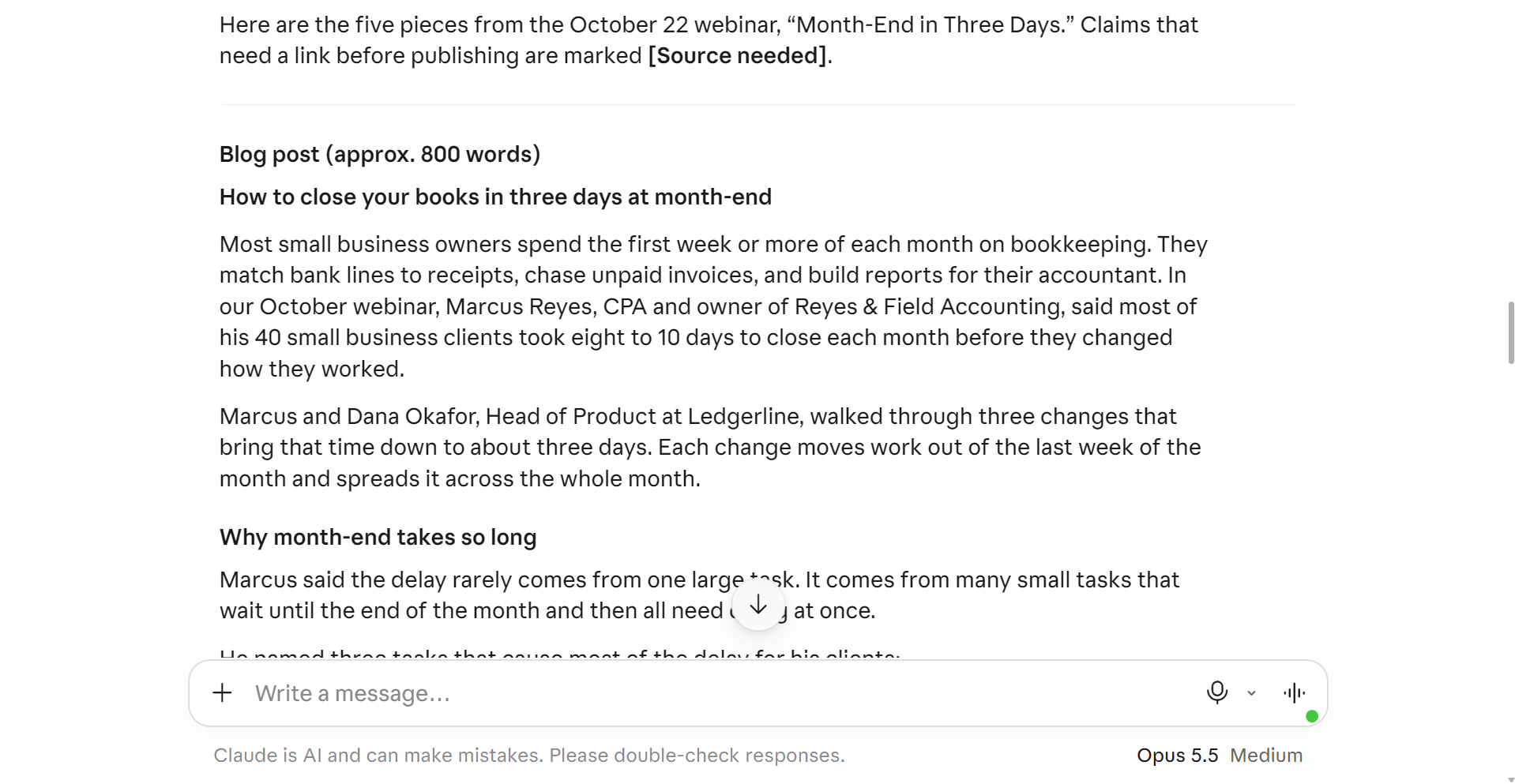
Claude helps you plan content from keyword data you already have. You paste a keyword export from your SEO tool, and Claude groups the terms by search intent, suggests pages, and outlines each one.
Keep the search volumes from your SEO tool in what you paste. Claude doesn’t have any keyword volume or ranking data of its own, so the plan only uses real figures if you supply them.
Best for: SEO specialists and content leads who are planning a quarterly calendar.
Here is a keyword export with monthly search volume [paste]. Group the keywords by search intent and funnel stage. Suggest one page for each group, with a working title, the main question it answers, and the keywords it should cover.
Claude writes many ad variants quickly, which helps when you need versions to test. Give it the product, the audience, the benefits, and your character limits, and it returns headlines and descriptions that fit them.
It also reviews landing pages. Paste the page copy and the ad that sends traffic to it, and ask Claude where the page fails to match the ad’s offer.
Best for: PPC managers and freelancers who test new copy every week.
Write 10 search ad headlines under 30 characters and four descriptions under 90 characters for [product], aimed at [audience]. Base them on these benefits: [benefit 1], [benefit 2], and [benefit 3]. Show the character count next to each line.
Claude drafts full email sequences, subject lines, and preview text. It can also rewrite one email for different segments, such as trial users and paying customers.
Give Claude the goal of each email, the action you want readers to take, and one past email that performed well. Then A/B test its subject lines in your email platform, because open rates from real subscribers show which one works best.
Best for: Lifecycle marketers and agencies that run email for several clients.
Write a three-email welcome sequence for new [product] trial users. Email 1 explains the first setup step, email 2 shares this customer result [paste], and email 3 asks them to [action]. Give each email three subject line options under 50 characters.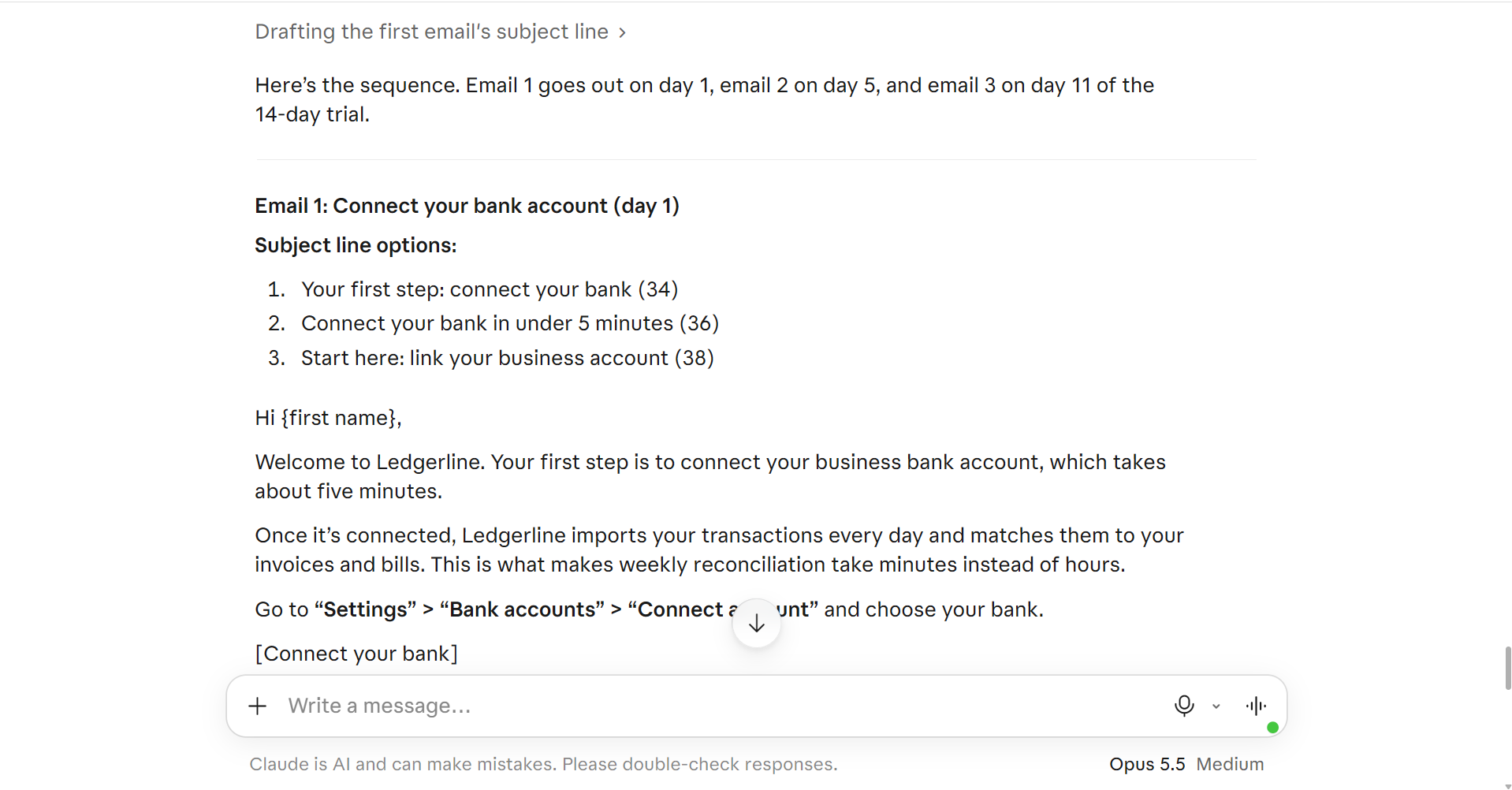
Claude adapts one message to the style of each social platform. It also drafts replies to comments and community questions, which helps when messages pile up after a launch.
For replies, give Claude your community guidelines and a few examples of good replies. Review each draft before you post it, because every reply goes out under your brand’s name.
Best for: Social media managers and small teams that run several profiles.
Here are our community guidelines [paste] and five recent comments [paste]. Draft a reply to each comment in under 50 words. Answer questions directly, thank people for feedback, and flag any comment that needs a person on our team to respond.
Claude finds patterns in large amounts of customer text. You paste reviews, survey answers, sales call notes, or support tickets, and it groups them into themes.
Ask Claude to quote the source text for each theme. Anthropic’s prompting guide recommends grounding answers in quotes from your documents, which also lets you check each theme against the original.
These themes are useful inputs for marketing intelligence work, such as positioning and message tests.
Best for: Product marketers and agency strategists who are preparing a new campaign.
Here are 60 customer reviews [paste]. Group the praise and complaints into themes, count how many reviews mention each theme, and quote one review word for word for each. List the three themes that should shape our next campaign message.
Claude explains performance data and turns it into summaries for clients or managers. On its own, it only sees the numbers you paste or upload, so most teams start by exporting a report.
A connector removes the export step. For example, Reporting Ninja’s Claude MCP connector gives Claude access to Google Ads, Meta Ads, GA4, and your other connected channels, so it answers from each platform’s live data, on any Claude plan, including Free.
With write access turned on, Claude can also build the report in Reporting Ninja, apply your client’s brand, and schedule delivery. It asks for your approval before anything is scheduled or shared with a client, which makes setting up automated marketing reports a task you can do from a chat.
Inside our platform, the AI reporting tool builds a report from one sentence. Nothing is created until you approve the proposed sections, widgets, and sources.
Best for: Agencies that send monthly client reports and in-house teams that update leadership every week.
Using Reporting Ninja, compare [client]'s Google Ads and Meta Ads spend, conversions, and cost per conversion for last month against the month before. Write a five-bullet summary for the client, with one next step for each channel.Start a 15-day free trial of Reporting Ninja. Connect Claude and ask about last month’s results across every ad platform you run.
Paste any prompt into Claude, replace the text in square brackets, and run it inside a Project so Claude already knows your brand voice.
Act as a senior B2B SaaS copywriter. Using this brand-voice brief [paste], write five LinkedIn posts under 200 words on [topic]. Open each post with a specific fact or result, and end with a question for readers.Rewrite this blog post [paste] for [new audience]. Keep the structure and facts, change the examples to fit their job, and list every change you made.
Cluster these keywords [paste] by funnel stage and suggest one page per cluster. For each page, give a title under 60 characters and the three questions it must answer.Compare our page [paste] with these three top-ranking pages [paste]. List the questions they answer that ours doesn't, starting with the question that appears on the most pages.
Here are our five best-performing ads from last quarter [paste]. Write 10 new variants that keep the same offer, and test a different first line in each one.
Here is an email with a low click rate [paste]. Suggest three reasons readers didn't click, then rewrite the email to fix the most likely one.
Turn this case study [paste] into posts for LinkedIn, Instagram, and X. Match each platform's usual length and tone, and keep the same main result in every post.
Here are notes from 10 sales calls [paste]. List the objections prospects raised, how often each one came up, and one direct quote for each. Then suggest one landing page change for the most common objection.
Turn this month's metrics [paste] into a five-bullet executive summary with next steps. Explain each change in plain words, and name the number it comes from.Using Reporting Ninja, show [client]'s GA4 sessions and conversions by channel for this quarter against last quarter. Point out the three biggest changes, and draft two sentences on each for the client report.The second reporting prompt needs a live data connection, such as Reporting Ninja’s connector for Claude, which reads each platform’s API.
Both prompts produce what effective marketing reports need, which is what changed, why it changed, and what to do next.

Getting Claude connected to your marketing data is only half the equation. How you structure your prompts, provide context, and interpret its outputs determines how much value you get from it. Here are a few best practices to get more useful, actionable results:
Anthropic’s prompting guide says Claude responds well to clear, explicit instructions. Name the audience, tone, format, length, and goal in every prompt.
The same guide suggests a simple test, which is to show your prompt to a colleague. If they would be confused by it, Claude would be, too.
Specific prompts matter most when you analyze marketing data, because a vague question returns a vague summary.
Start with one sentence that sets a role, such as “You are a PPC manager writing for a client who isn’t technical.” Anthropic says even a single sentence stating its role focuses Claude’s behavior and tone.
Explain why each rule exists. “Keep subject lines under 50 characters because most of our readers open email on their phones” gives Claude more to work with than the rule alone.
Anthropic recommends three to five examples for the best results. Use your best-performing posts, ads, or emails, and wrap each one in example tags so Claude knows it is a sample.
Make the examples different from each other. If every example opens with a question, Claude may copy that pattern in every new draft.
Before Claude writes an important page or campaign, ask it to review your brief. A prompt such as “List what is missing or unclear in this brief before you write” finds gaps early.
After the draft, ask Claude to check it against your criteria. Anthropic’s guide suggests ending a prompt with an instruction to verify the answer against set criteria before finishing.
When a draft is close to what you want, tell Claude exactly what to change in the same chat. “Shorten the intro to two sentences and replace the second example with a SaaS company” keeps the parts that already work.
If you regenerate the whole draft, you may end up with a new version that drops the parts you liked. Small, specific follow-ups keep your progress.
Claude has six main limits for marketing work, and each one has a practical workaround.
| Limitation | Why it happens | Workaround |
|---|---|---|
| No access to your marketing accounts | Claude only sees what you paste, upload, or connect | Connect your accounts through a connector or MCP server |
| Incorrect facts or numbers | Claude can occasionally produce incorrect or misleading responses | Check every claim against its primary source |
| Charts from pasted data don’t update | A chart built from pasted numbers shows only those numbers | Use a reporting tool for recurring dashboards and client reports |
| No publishing on its own | Claude can’t reach your website, ad accounts, or social profiles unless you connect them | Publish from your existing tools after a review |
| Output depends on the brief | Vague prompts return generic drafts | Use a brand-voice brief, examples, and a clear format |
| Usage limits | Every plan has limits that reset every five hours and every week | Move to a higher plan, or spread heavy tasks across the week |
The data limit matters most for reporting. When Claude reads accounts through Reporting Ninja’s AI connector, every figure comes from the source platform’s API, and the connector is read-only by default. It also removes the manual marketing data integration work of exporting and merging reports.

Output quality is the most common complaint. In a Sprout Social community thread, one marketer wrote that Claude was “not that much better than ChatGPT for me,” even after adding a brand tone.
Anthropic’s guide names examples as one of the most reliable ways to steer tone, so add three to five past pieces before you judge the output. If the drafts still need heavy edits, test the same brief in another tool and keep the one you can fix with the least amount of work.
Claude writes better reports when it reads real numbers. Connect your marketing accounts once in Reporting Ninja, add our connector to Claude, and ask about performance across every marketing channel, paid or organic, in plain words.
Claude can then draft the client report from those figures. With write access on, it can also build the report in your account with your brand, a scheduled report delivery, and a client portal view.
Every one of our pricing plans includes every feature, including the MCP connector, from $20 a month, billed annually.
Start with one client this week. Connect their accounts, ask Claude your first question, and check the answer against the platform. Start your free 15-day trial.
{{cta-block-v1}}
Yes. Claude is useful for drafting content, planning SEO, writing ads and emails, researching customers, and summarizing performance data. It needs a clear brief and context, and you should check its facts before you publish.
Sometimes. The answer depends on your tasks and on how you prompt each tool. Run the same brief and examples through both, and keep the one whose drafts need the fewest edits.
Yes, through connectors. On its own, Claude only sees what you paste or upload, but Reporting Ninja’s MCP for Claude lets it read Google Ads, GA4, Meta Ads, and other channels. The same connector works with ChatGPT too.
Yes, with sensible limits. Keep customers’ personal data out of your chats, use read-only connectors where you can, and review your privacy settings. On individual plans you can opt out of model training, and Team and Enterprise plans don’t train on your content by default.
Sign up for a 15 days free trial. No credit card required.

Build and automate amazing custom reports in a few clicks. Save time, be more productive, impress your clients.