SEO
July 7, 2026
White label SEO reports: how-to, solutions, automations and more



SEO reporting does more than track rankings, traffic, and other key metrics. It helps agencies demonstrate progress, justify their recommendations, and show clients how SEO contributes to business outcomes.
A white label SEO report strengthens that experience by removing third-party branding and presenting every insight under your own agency's identity, turning a generic dashboard export into a polished, client-ready deliverable.
In this guide, you'll learn what every white-label SEO report should include, how to build one efficiently, common mistakes to avoid, and the features to look for when choosing reporting software.
Agencies that skip white-labeling are handing clients a subtle reminder that they're paying for someone else's tool, not your expertise. Here's what changes when you fix that.
When reports consistently use your logo, colors, and messaging instead of a third-party platform's branding, clients associate the insights and results with your expertise and not the software behind the scenes. Over time, this reinforces your agency's identity across every monthly touchpoint and creates a more professional, cohesive experience that clients are more likely to remember.
A branded report also creates a smoother client experience because it presents insights in a familiar format instead of feeling like an export from another platform. Clients shouldn’t context-switch between your emails and someone else's interface to understand their results. A consistent visual identity and reporting experience make reports easier to navigate and support the impression of a cohesive, well-managed service.
White-label reports make your reporting process feel like part of a proprietary service rather than an exported dashboard. A polished, consistently branded reporting experience helps agencies position their services as more premium and differentiated, especially when competing against firms that rely on generic software exports.
With white-labeled, templated reports, you're not rebuilding a deck from scratch for every new client. Once your branding and structure are set, adding multiple new clients is a matter of connecting a new data source, not designing a new report.
{{cta-block-v1}}
White-label reports are also valuable during pitches, proposals, and performance reviews. A polished, agency-branded report demonstrates the quality of your reporting process before a prospect signs on, which matters more in a pitch than most agencies realize.
A white-label SEO report should help clients understand what happened, why it happened, what it means for their business, and what comes next. Every section should answer a question the client is likely to ask.
Your cover page should immediately establish that the report comes from your agency, with your logo, colors, the client's name, and the reporting period. Directly after it, include an executive summary that answers three questions before the client looks at a single chart:
Many business owners and executives never read beyond this page, so it should communicate the report's biggest insights in plain language rather than technical SEO terminology.
For example:
Organic traffic increased 14% month over month, driven primarily by improved rankings for three commercial landing pages. While conversions remained stable, technical improvements completed this month position the site for stronger performance next quarter.
This section should show organic traffic trends alongside keyword rankings for the terms that actually matter to the client's business. More importantly, explain what caused the movement. A chart showing a 20% traffic increase becomes much more valuable when paired with context, such as recently published content, technical fixes, or improved rankings for high-intent keywords.
For example:
"Traffic to the pricing page increased 28% after it moved from position 9 to position 3 for 'enterprise accounting software,' generating 17 additional demo requests."
Clients want to know if their target terms are moving in the right direction, not a lesson on how your search engine ranking reports are built.
Include new and lost backlinks for the period, alongside technical issues, such as crawl errors, site speed regressions, and indexation drops that are capping performance. This section is usually skipped because it's less visually exciting than traffic charts, but it's often where you find the real reason for certain metrics, e.g., stalled rankings despite steady content output.
Tie organic performance back to leads, sales, or another conversion event the client actually cares about. This section should answer the question every client is really asking: is this working, and is my agency doing better than the alternative? Skipping it is the single most common reason strong SEO work still gets undervalued.
Standard SEO reports and white-label SEO reports often contain similar data. The difference is how they're presented, branded, and delivered to clients.
Reviewing a live example of a white-label SEO dashboard side by side with a default export makes the difference obvious within seconds, even to a client who's never thought about reporting software before.
Here's the roadmap before we get into the details of each step.
Choosing an SEO reporting tool should be more of a workflow decision than a software one. The platform you choose determines how much time your team spends collecting data, formatting reports, applying branding, and delivering updates each month. If those tasks remain manual, reporting becomes harder to scale.
Some platforms allow little more than replacing a logo, while vendor branding remains visible in report footers, login portals, email notifications, or shared dashboard URLs. You want to ensure you check every client-facing touchpoint before committing to a platform.
Reporting Ninja removes those limitations by letting agencies apply their branding across reports, dashboards, and the client portal. It also supports multichannel campaign management, making it easier to report across all your marketing services.
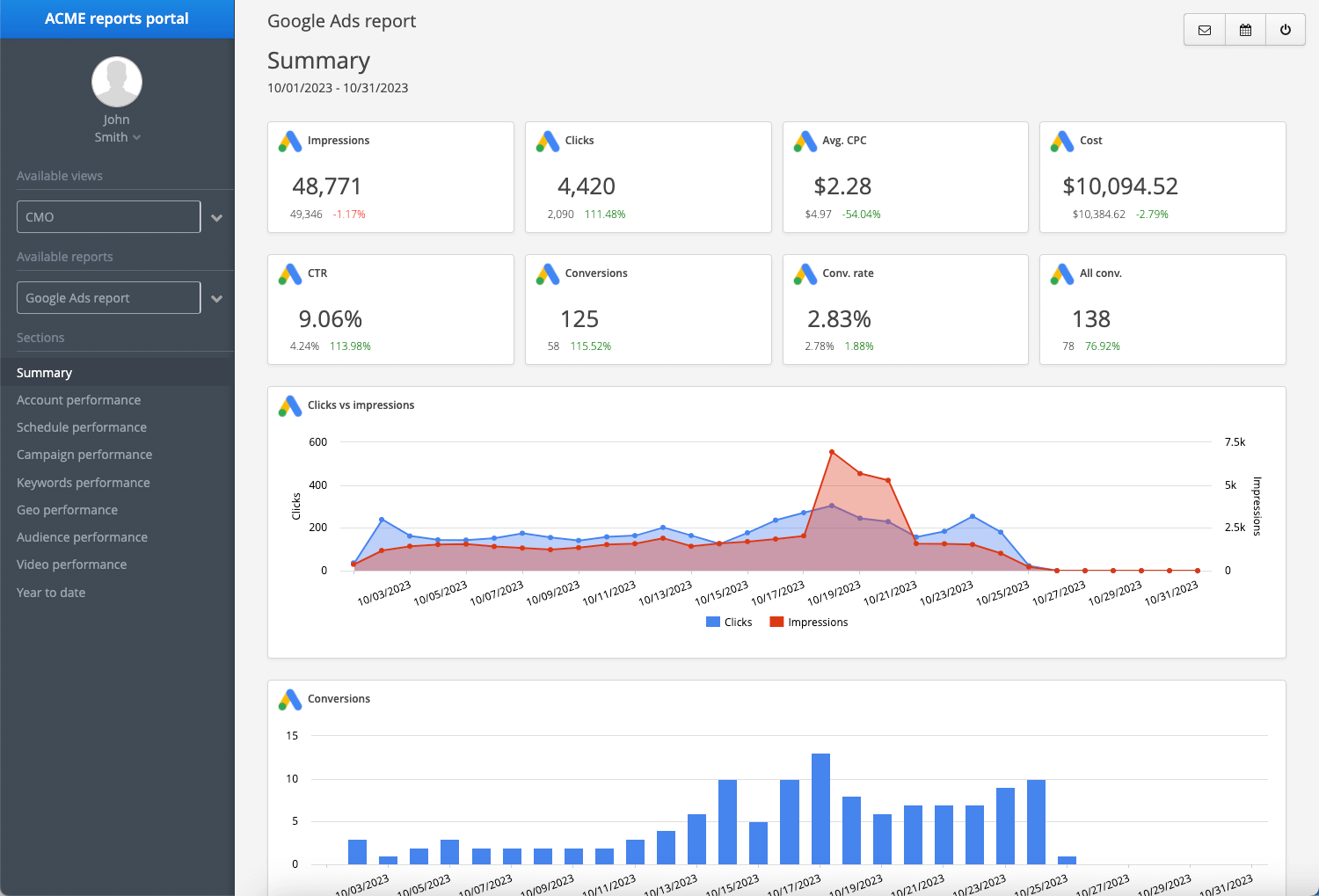
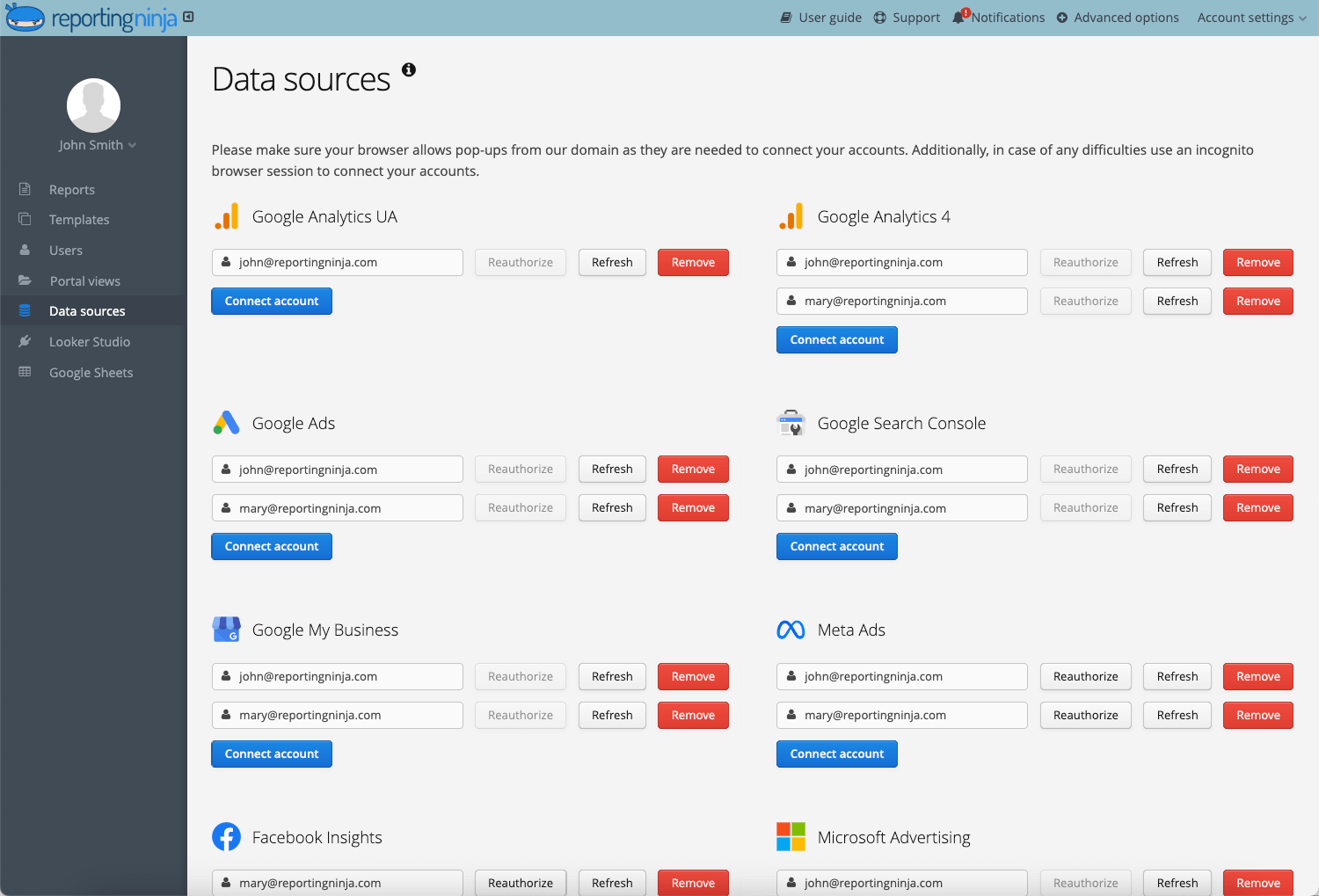
Before building your first report, confirm that every connected data source is collecting complete and accurate historical data. Missing tracking codes, incorrect attribution settings, or disconnected integrations can quickly undermine client confidence, even if your SEO work is delivering results.
For example, if Google Analytics 4 (GA4) wasn't tracking conversions correctly for half the reporting period, your SEO campaign may appear less effective than it actually was.
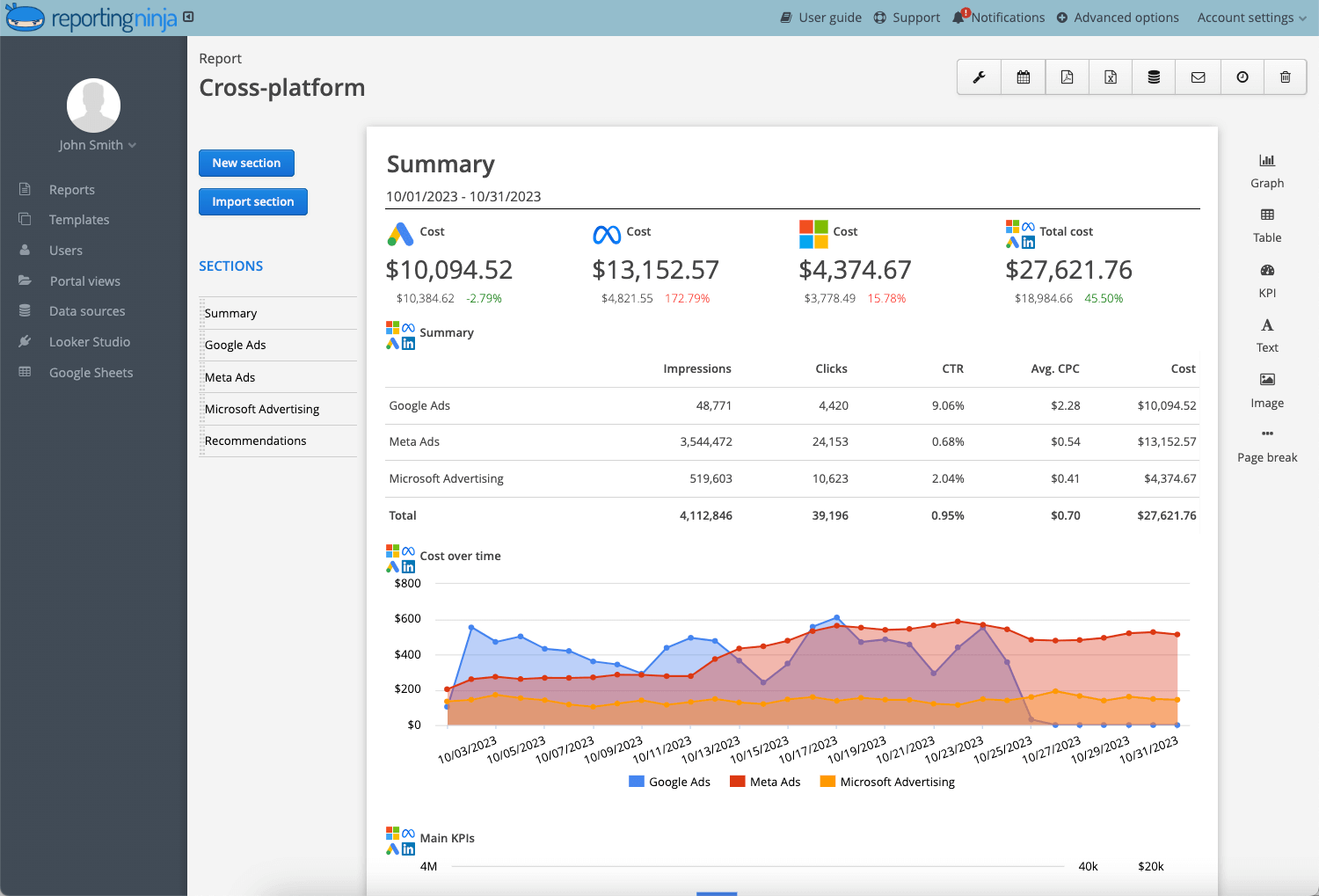
Lay out your sections in the order clients will actually read them: executive summary first, then organic performance, backlinks, and technical health, then conversions. Getting this order right is important, since most clients read the first third of a report closely and skim the rest.
Reports should tell a story. Jumping straight into keyword rankings without first explaining overall performance forces clients to interpret the data themselves. A logical structure helps readers understand the narrative before diving into the details.
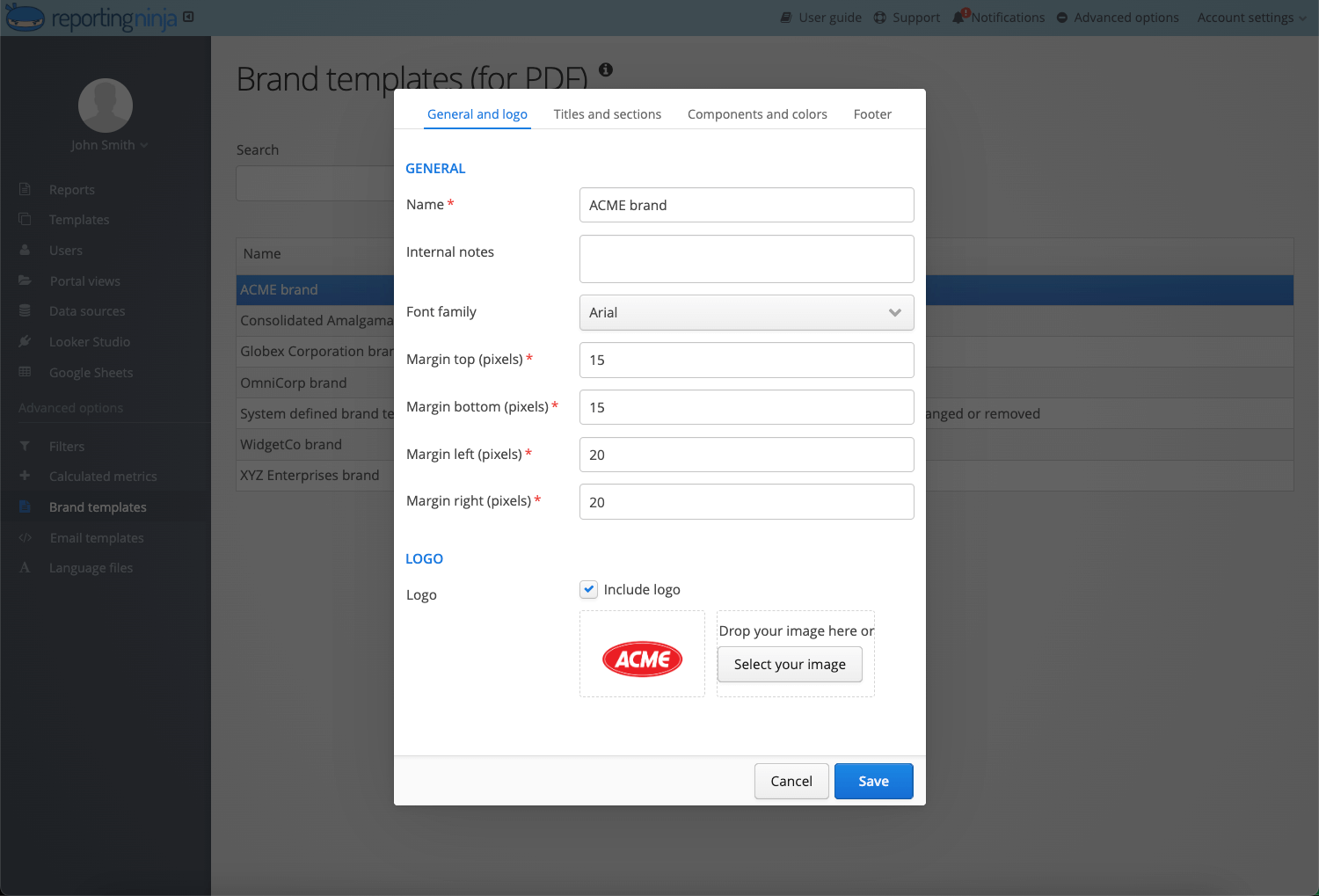
Upload your logo and use consistent colors, typography, terminology, and report structure so every client interaction reinforces your agency's identity. Even small inconsistencies, such as different chart colors or generic system emails, can make reports feel less polished.
A custom SEO dashboard should look and feel like it came from your agency's design system, down to the chart colors matching your brand palette.
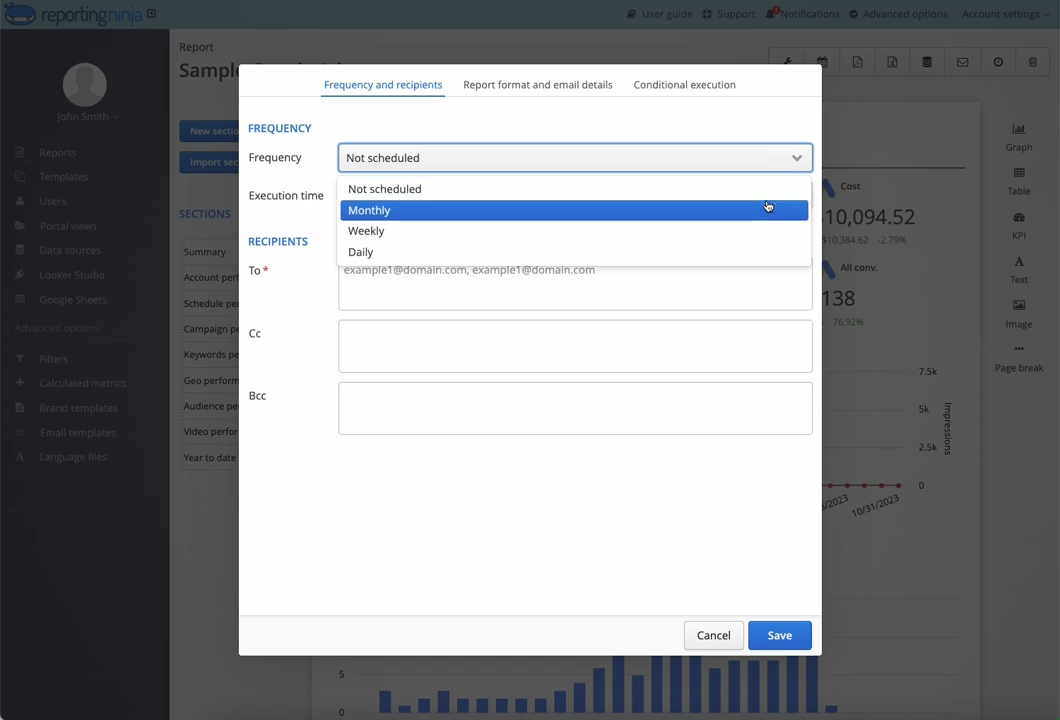
Set your report to generate and send automatically on a fixed schedule, rather than manually pulling and emailing it every month. As much as automating is supposed to help you save time, it should also create a consistent reporting rhythm that clients begin to expect. This tells them that their campaigns are actively being monitored rather than reviewed only when someone remembers.
Reporting Ninja generates branded reports, refreshes your connected data sources, and schedules recurring deliveries automatically, so your team spends more time interpreting results instead of formatting documents. Start your free trial to see how it works.
Seeing how these reports differ by use case makes it easier to decide which structure fits your client base.
Objective: Summarize month-over-month SEO performance, explain the reasons behind key changes, and outline the priorities for the coming month.
Target audience: Business owners, marketing managers, and clients who want a regular overview of campaign progress.
Key metrics:
What makes this report effective? A monthly SEO report should tell a story rather than simply present data. Start with an executive summary that explains the month's biggest wins, setbacks, and next steps before diving into charts. Each major metric should answer business questions like:
Example insight: Organic traffic increased 18% after three product pages reached Google's top five results, generating 24 additional demo requests compared to last month.
Objective: Provide senior stakeholders with a concise overview of SEO performance and business impact without too much technical detail.
Target audience: C-suite or non-marketing stakeholders.
Key metrics:
Detail belongs in an appendix here, not the main view, since SEO reports built for clients at this level succeed or fail based on how quickly they can understand the headline.
Why this view works for leadership: Executive dashboards should prioritize outcomes over activities. Rather than listing every ranking change or technical issue, focus on whether SEO is contributing to broader business objectives. Supporting charts should reinforce the headline rather than become the headline.
Example insight: Organic search generated 31% of all qualified leads this quarter, making it the company's second-largest acquisition channel after paid search.
{{cta-block-v1}}
Objective: Compare search performance across locations to identify high-performing branches and those needing additional attention.
Target audience: Franchise owners, regional marketing managers, and businesses operating across multiple locations.
Key metrics:
A local SEO report needs a location filter or breakdown built in from the start, since clients managing multiple sites want to compare them side by side, not read five separate documents.
Why one dashboard beats five separate reports: Instead of creating separate reports for every location, consolidate performance into a single dashboard with location-level comparisons. This helps decision-makers identify trends much faster and allocate marketing resources where they'll have the greatest impact.
The best platform for you is the one that reduces manual work, supports your agency's workflows, and delivers a consistently professional experience for every client.
The features in this table are the difference between a reporting tool you configure once and one you fight with every month. Explore Reporting Ninja’s custom reports platform to see them in action.
A white label SEO report replaces the reporting software's branding with your agency's own. The logo, colors, and formatting a client sees are yours, not a vendor's. That only works if the branding holds up everywhere a client touches, be it the cover page, the dashboard, or the delivery email.
Getting that right by hand means rebuilding formatting and reapplying branding every single month, which is exactly the part most agencies want to stop doing. Reporting Ninja applies your logo, brand colors, fonts, and graph styles across every report automatically. It can even email finished reports to clients automatically at your preferred cadence or serve them through a branded client portal on your own domain.
Ready to generate fully branded SEO reports automatically, without any manual formatting? Start your 15-day free trial.
Yes. Platforms built for white-labeling (such as Reporting Ninja) remove vendor branding from the cover page, footers, and even client-facing portals, not just the report's main body.
Monthly is the standard cadence for most agency-client relationships, though executive summaries or dashboards are sometimes shared more frequently for active campaigns.
Reporting platforms that connect directly to your data sources and handle scheduled, branded delivery remove the recurring manual work. Reporting Ninja is one example: it pulls data from your SEO and marketing sources automatically, applies your agency's branding to every report, and delivers them on a set schedule through email or a branded client portal.
Yes. Most agencies build a standard reporting framework and then customize KPIs, commentary, branding, or report sections to reflect each client's goals and industry while keeping the overall structure consistent.
{{cta-block-v1}}
Sign up for a 15 days free trial. No credit card required.

Build and automate amazing custom reports in a few clicks. Save time, be more productive, impress your clients.